


🎔
Hello newbies! Here, it's a thread to better make your layouts by personalising: GIFs, Photos, Center... How to find oneself when you're new to Kprofiles Forums.
1. The Pfp
This is usually the easiest part. You just have to go to 'Account Details' Or just click on your username, and click on 'Edit' When your mouse is over your pfp.

2. Signature/Sig
You have to
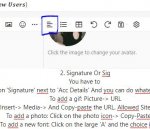
Click on 'Signature' next to 'Acc Details' And you can do whatever you want.
To add a gif: Picture-> URL
or Insert-> Media-> And Copy-paste the URL. Allowed Sites are here.
To add a photo: Click on the photo icon-> Copy-Paste URL.
To add a new font: Click on the large 'A' and the choice is yours.
You can also Copy-Paste a font from another font site (I personally use mesletters.)
To center the text: Click on the lines.
Edit: Note by @SpaceQueen800 do not forget to put your sentences in black(or another color) , otherwise if you leave them like this the sentences will turn gray.
And You can put only 3 pics/gifs.
Your Sig is over!
Example:
𝕄𝕠𝕟𝕠𝕔𝕙𝕣𝕠𝕞𝕖 𝕋𝕠 ℂ𝕠𝕝𝕠𝕣𝕤


𝕋𝕙𝕚𝕤 𝕀𝕤 𝔼𝕧𝕠, 𝔼𝕧𝕠𝕝𝕦𝕥𝕚𝕠𝕟
Or:
𝕄𝕠𝕟𝕠𝕔𝕙𝕣𝕠𝕞𝕖 𝕋𝕠 ℂ𝕠𝕝𝕠𝕣𝕤


𝕋𝕙𝕚𝕤 𝕀𝕤 𝔼𝕧𝕠, 𝔼𝕧𝕠𝕝𝕦𝕥𝕚𝕠𝕟
3. Bio
You can use all the other tips / instructions to make your own bio. To add a spoiler: Insert-> Spoiler
To add an inline spoiler: Insert-> Inline Spoiler
Play with the size, the font, the layout as you wish.
Thanks for reading! Hope this has all helped you!
You can ask questions!
🎔
Hello newbies! Here, it's a thread to better make your layouts by personalising: GIFs, Photos, Center... How to find oneself when you're new to Kprofiles Forums.
1. The Pfp
This is usually the easiest part. You just have to go to 'Account Details' Or just click on your username, and click on 'Edit' When your mouse is over your pfp.
2. Signature/Sig
You have to
Click on 'Signature' next to 'Acc Details' And you can do whatever you want.
To add a gif: Picture-> URL
or Insert-> Media-> And Copy-paste the URL. Allowed Sites are here.
To add a photo: Click on the photo icon-> Copy-Paste URL.
To add a new font: Click on the large 'A' and the choice is yours.
You can also Copy-Paste a font from another font site (I personally use mesletters.)
To center the text: Click on the lines.
Edit: Note by @SpaceQueen800 do not forget to put your sentences in black(or another color) , otherwise if you leave them like this the sentences will turn gray.
And You can put only 3 pics/gifs.
Your Sig is over!
Example:
𝕄𝕠𝕟𝕠𝕔𝕙𝕣𝕠𝕞𝕖 𝕋𝕠 ℂ𝕠𝕝𝕠𝕣𝕤
𝕋𝕙𝕚𝕤 𝕀𝕤 𝔼𝕧𝕠, 𝔼𝕧𝕠𝕝𝕦𝕥𝕚𝕠𝕟
Or:
𝕄𝕠𝕟𝕠𝕔𝕙𝕣𝕠𝕞𝕖 𝕋𝕠 ℂ𝕠𝕝𝕠𝕣𝕤
𝕋𝕙𝕚𝕤 𝕀𝕤 𝔼𝕧𝕠, 𝔼𝕧𝕠𝕝𝕦𝕥𝕚𝕠𝕟
3. Bio
You can use all the other tips / instructions to make your own bio. To add a spoiler: Insert-> Spoiler
To add an inline spoiler: Insert-> Inline Spoiler
Play with the size, the font, the layout as you wish.
Thanks for reading! Hope this has all helped you!
You can ask questions!
🎔
Last edited: